

A 4D construction animation is a 3D model of your project tied to the construction schedule, so you can watch the building assemble itself over time — foundations, structure, skin, and sitework appearing in the real order they’ll be built. The “4D” is that fourth dimension: time. A 3D model shows you what the building is. A 4D construction animation shows you how and when it comes together. For a pursuit team or an owner trying to understand a complex sequence, that difference is everything.
I’ve been building these for over a decade. Across 10+ years in construction and virtual design and construction — about four of them on-site, the rest on the office and VDC side — 4D construction animations have been the throughline. So this is the plain-English version a builder would give you, not a software brochure.
What the “4D” actually means
Construction has borrowed the “dimensions” shorthand to describe how much information a model carries:
- 3D is the geometry — the shape of the building in space.
- 4D adds time: every element in the model is linked to its activity in the construction schedule, so the model can play forward and show the build sequence.
- 5D adds cost, 6D sustainability/facility data, and so on — but 4D is the one that matters for showing how a job gets built.
So a 4D construction animation is the visual output of linking a 3D model to a schedule. Press play and the site clears, the foundations go in, the structure rises floor by floor, the envelope closes, and the cranes come and go — each step appearing when the schedule says it happens. You’re not watching a generic build-up; you’re watching this project’s actual sequence.
A 3D model shows you what the building is. A 4D animation shows you how — and when — it comes together.
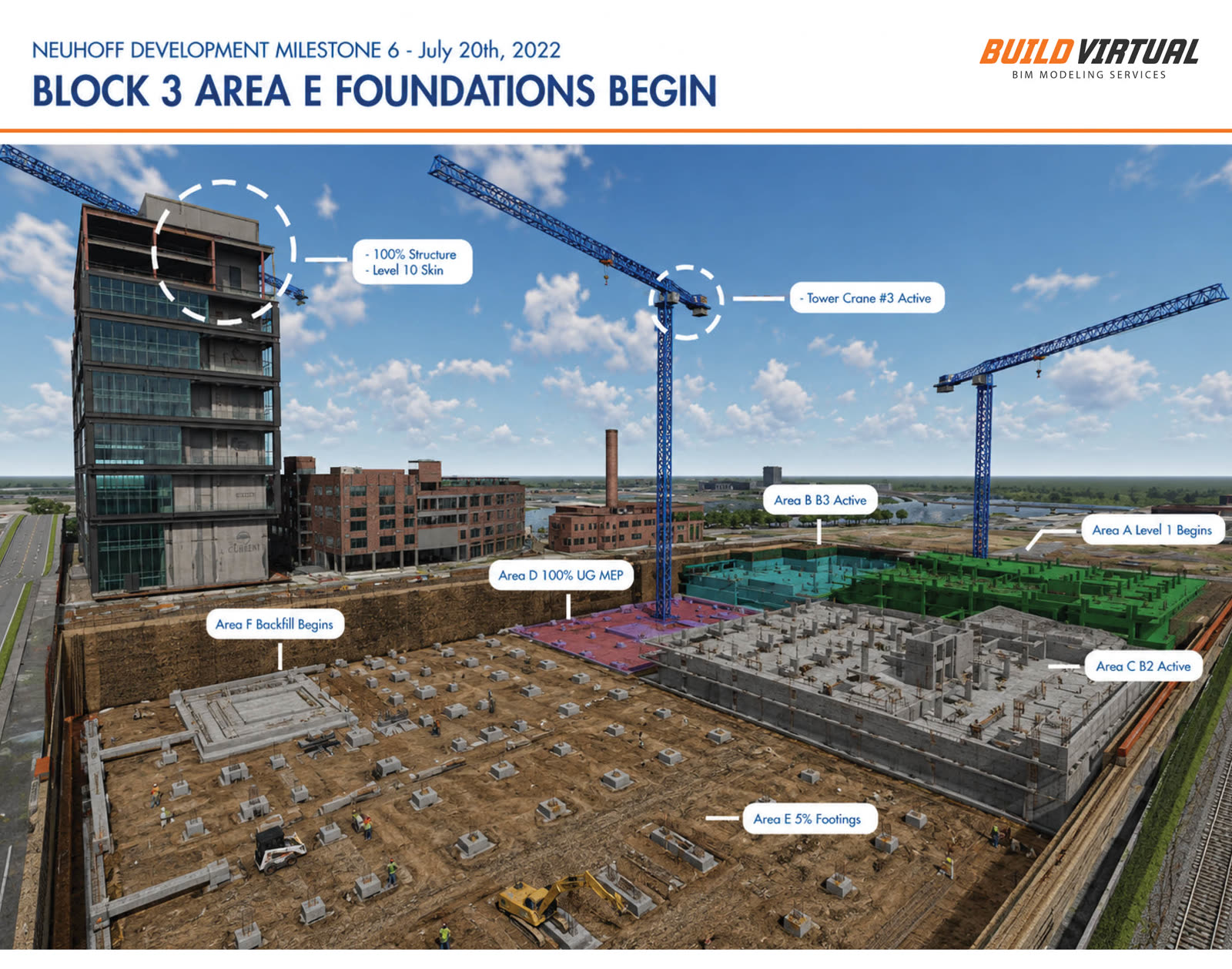
4D BIM, 4D sequencing, 4D visualisation — same thing?
Mostly, yes — and the overlapping terms cause real confusion, so here’s the plain map. 4D BIM is the technical term for the underlying model-plus-schedule data. A 4D construction sequencing animation or 4D construction visualisation — visualization, if you spell it the American way — is what you actually watch: the rendered video that communicates that data to a human. People also say 4D tender animation when the purpose is winning a bid or tender. Different words, same core idea: the model, tied to the schedule, made visible. What separates a useful one from a decorative one isn’t the label — it’s whether the sequence underneath is genuinely buildable.
How a 4D construction animation gets built
The workflow is more grounded than most people expect — it’s construction logic first, visuals second:
- Start with the model. A 3D model of the project — either one you already have or a Revit model I build from your drawings and sketches.
- Tie the model to the schedule. Each element is linked to its construction activity, so the model knows what gets built when. This is the actual “4D” step, and it’s where construction knowledge matters most — the sequence has to reflect how the job really goes together.
- Review the sequence for buildability. Before anything is rendered, the order of operations gets pressure-tested: does the structure rise in a believable order, do the cranes have room, does the long-lead work land in the right place? This is where field experience earns its keep — a smooth animation of an unbuildable sequence fools no one who’s run a jobsite.
- Render and pace it for its audience. Finally it’s rendered into video, paced and structured for how it’ll be used — a tight, narrated cut for an interview room plays very differently from a detailed internal coordination study.
The order matters: a 4D construction animation built schedule-first is a planning tool that happens to look good. One built visuals-first is a cartoon. The whole value is in step 2 and 3.
Why a 4D construction animation wins pursuits and tenders
This is where the 4D animation stops being interesting and starts being worth money. In a competitive pursuit or tender, every shortlisted team is qualified — strong proposal, solid references, price in range. What separates the winner is usually the committee’s confidence that your team has genuinely thought through how this specific building gets built on this specific site.
A written narrative asks them to take your word for it. A 4D construction animation shows them. When the panel watches your tower crane go up, your excavation phase clear, and your structure rise floor by floor — with the site staying open and safe through all of it — your approach stops being a claim and becomes something they’ve seen. That shift, from described to demonstrated, is the whole game. It’s also a great equalizer: a regional contractor with a clear, buildable visual can out-communicate a larger competitor who walked in with bullet points. (I went deeper on the room itself in how construction animations win bids.)
There’s a quieter benefit, too. Many committees include owners, architects, and stakeholders who don’t read construction schedules for a living. A Gantt chart means little to them; a sixty-second animation of the building assembling itself means everything. The animation translates your plan into a language the whole room understands at once.
When a 4D animation is worth it — and when it isn’t
I’d rather tell you to skip it than sell you a visual that won’t change the outcome. A 4D construction animation earns its keep when the selection is competitive and qualifications- or interview-based, when the site or phasing is genuinely hard — a tight urban site, an occupied facility, a complex sequence — and when the committee decides on confidence, not just low price. That’s the sweet spot, and it’s the kind of work in the portfolio.
It’s usually not worth it on a pure hard-bid, low-bid job where price is the only thing scored, or on a site so simple the sequence is obvious to anyone. In those cases the money is better spent elsewhere, and I’ll say so. If you want to see how this plays out in the room — what to show, when it’s worth it — the full approach lives on the 4D construction animations page.
Frequently asked questions
What is a 4D construction animation in simple terms?
It's a 3D model of your project linked to the construction schedule, so you can watch the building get built over time in the real order it happens. The "4D" is the fourth dimension — time. It answers "how and when will you build it," where a 3D model or rendering only answers "what will it look like."
What's the difference between 3D, 4D, and 4D BIM?
3D is the geometry — the shape of the building. 4D adds the schedule, so the model can play forward and show the build sequence. "4D BIM" is the technical term for that model-plus-schedule data; a 4D construction animation (or 4D visualisation) is the rendered video you actually watch. Same idea, different words.
Is a 4D animation the same as a rendering?
No. A rendering is a still image that answers "what will it look like when it's done." A 4D construction animation adds time — it answers "how will you build it," showing sequence, phasing, and site logistics. Design-forward interviews often lean on renderings; logistics- or phasing-heavy pursuits need the animation. Many use both.
Do I need a finished model and schedule to start?
It helps but isn't required. A design model and a sequence is the fast path. Earlier than that, I can build from drawings, sketches, and a sequence we work out together — and because I've worked on-site, I'll keep that sequence buildable, not just animated.
How much does a 4D construction animation cost?
It depends on length, level of detail, and how much usable model and schedule information you already have — so there's no honest flat number. The best move is to share your scope and your interview or tender date, and I'll tell you what's realistic. I'll also tell you if a couple of strong stills would do the job and a full animation would be overkill.