

A 4D construction animation gets built by linking a 3D model of the project to the construction schedule, then rendering the build sequence into a video a selection committee can watch. That’s the mechanical answer. The honest answer is that the software does the linking — and the value comes from the sequencing judgment in between: knowing how a site actually gets torn up, shored, poured, topped out, and closed in, and making the animation tell that story credibly.
I build these for a living — 4D construction animations and phasing plans for GCs and pursuit teams — after 10+ years in construction and VDC, about four of them on-site. If you’re still working out what a 4D animation is and why pursuit teams use them, start with my plain-English explainer. This post is the other half: what actually happens between “here’s our project” and a finished sequencing video, so you know what to expect — and what to ask for — whether you build one in-house or hand it to someone like me.
What the build needs before it starts
Two things drive the whole effort: a model and a schedule.
The model can come from you or from me. If your design team has a Revit model, that’s the fastest path — I take what exists and prepare it for sequencing. No model? I build one from the drawings. It doesn’t need every bolt modeled; it needs the elements that tell the construction story — structure, skin, major site features — at a level of detail that reads clearly on screen.
The schedule is the “4D” part — it’s what turns a spinning 3D model into a construction sequence. A milestone-level summary schedule is enough to start; the animation doesn’t need all four thousand activities, it needs the fifty that shape the build: mobilization, excavation, foundations, vertical structure by zone, skin, dry-in, sitework, turnover.
Step 1 — Prepare the model for time
A design model describes a finished building. A 4D model has to describe a building coming out of the ground, and that means surgery: splitting slabs into pours, columns into lifts, the skin into installation zones, the site into phases. This step is invisible in the finished video and it’s where a large share of the real work lives — if the model can’t break apart the way the job will actually be built, the animation can’t show it.
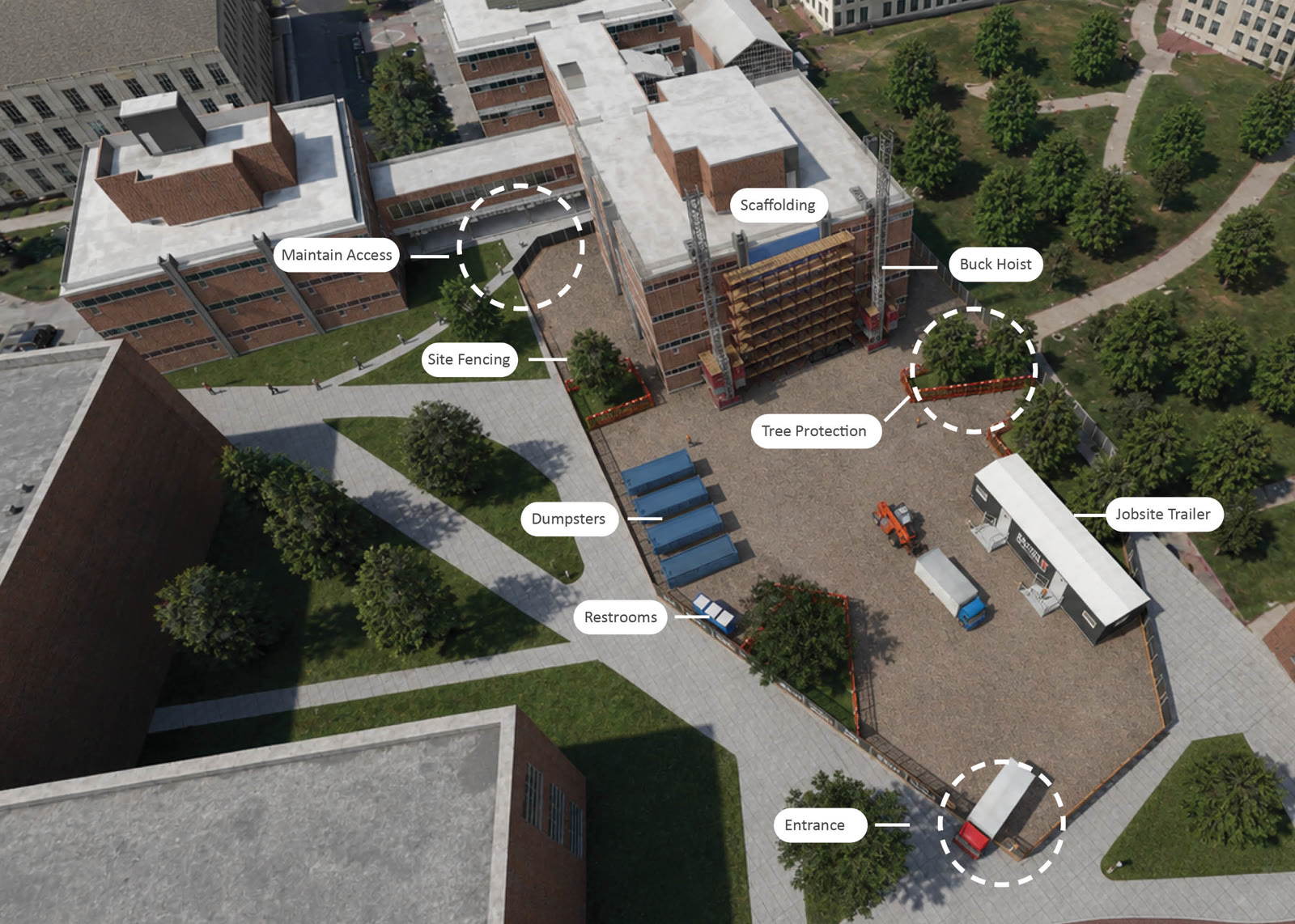
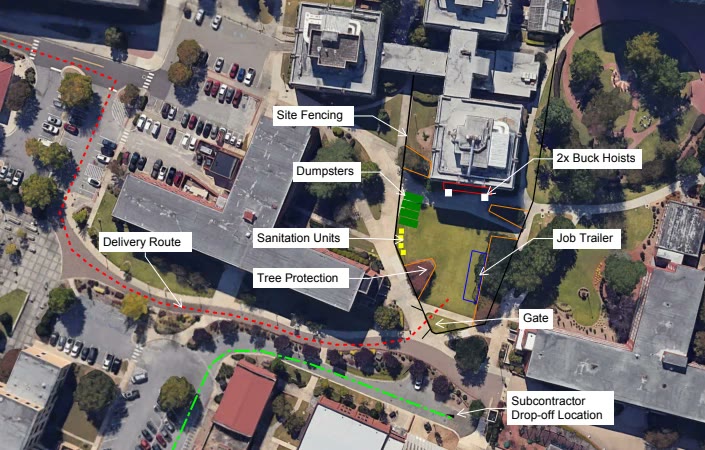
This is also where site context gets added — surrounding streets, neighboring structures, existing conditions — because a committee doesn’t just want to see your building; they want to see your building on that site, with the constraints they know are there.
Step 2 — Link model elements to schedule activities
Next, every moving piece of the model gets tied to the activity that drives it: this pour to this concrete activity, this zone of skin to this installation window, this crane to the duration it’s on site. Once linked, the model animates straight off the schedule logic — scrub to March and you see March; slide an activity and the sequence moves with it.
This is the step people picture when they think “4D,” and modern tools have made the linking itself reasonably efficient. Which is exactly why the linking isn’t the differentiator — the next step is.
Step 3 — Make the sequence behave like a real jobsite
Software will happily animate a building assembling itself in thin air. A committee full of builders will spot that instantly — and it costs you credibility, which is the one thing the animation exists to buy.
Software can make a building assemble itself. It can’t make the sequence believable. That part comes from having stood on a jobsite.
So this pass is where field sense goes in: the excavation opens before the foundations show up. The tower crane arrives, holds its position through structure, and comes down when the schedule says it does. Laydown and staging live where they’d actually fit. Haul routes and traffic control reflect the real street. Deliveries stage from the gate that exists. I spent about four of my 10+ construction years on-site, and that time gets used here more than anywhere else — it’s the difference between an animation that decorates your plan and one that proves you have one.
Step 4 — Review cycles with your team
You see a working draft early, and your team marks it up: the super wants the crane repositioned, the PM wants the phasing to match a revised pour plan, the pursuit lead wants the story to slow down where your approach wins the job. I fold in the changes and we go again. The sequence isn’t final until the people who will stand in front of the committee — or run the job — agree it reflects their plan. It’s your build strategy; the animation just makes it visible.
Step 5 — Deliverables: the video and the stills
The finished product is a rendered sequencing video, plus high-resolution stills and annotated exhibits — PDF and JPEG phasing plans and site-logistics graphics pulled from the same model. That mix is deliberate: the video anchors the interview, and the stills drop straight into the written proposal, the logistics narrative, and the boards. One coordinated visual story across every touchpoint of the pursuit — the same approach behind the project work in my portfolio, from a $42M stadium end zone to a $550M mixed-use development.
What software builds a 4D construction animation?
The stack I run: Revit for the building model, Infraworks for the surrounding site context, cmBuilder and Navisworks on the sequencing and coordination side, and Lumion for the final visual quality. Different studios assemble different stacks — the tools overlap, and no single license is “the” 4D software.
If you’re searching for 4D software because you’re weighing doing this in-house: the honest read is that the tools are the smaller cost. The licenses are real money, but the learning curve is measured in months, and the sequencing judgment — Step 3 — doesn’t come in the box at any price. If your team builds pursuit visuals every month, invest in the capability. If you need a committee-grade animation for the pursuit in front of you, hiring it out is almost always faster and cheaper than standing up the pipeline yourself.
How long does the build take?
For most projects, about two weeks start to finish — faster when a clean model and a summary schedule exist on day one, longer when the model is built from drawings or the pursuit needs multiple scheme options. Review cycles are usually the schedule driver, so the fastest builds are the ones where your team engages the draft early.
Frequently asked questions
What do I need to provide to get a 4D animation built?
At minimum, drawings and a milestone-level schedule; ideally, a design model too. A kickoff conversation about your build strategy — crane plan, phasing intent, site constraints — does more for the final product than any file transfer.
Do you need our full CPM schedule?
No. The animation runs on the fifty activities that shape the build, not the full network. A summary or milestone schedule is enough — I'll flag where the sequence needs a decision the schedule doesn't answer.
What's the difference between 4D sequencing and a construction animation?
"4D construction sequencing" is the discipline — model elements tied to schedule time. A "construction animation" is the finished, rendered product built from it. If you want the fuller definition and why committees respond to them, that's covered in my "What Is a 4D Construction Animation" explainer here on the blog.
Can the animation be updated when the schedule changes?
Yes — that's a core reason the model gets linked to activities rather than hand-animated. Schedule slides, resequenced phases, and scope changes flow through as updates, not rebuilds. Pursuit-week revisions are normal, not an emergency.
How much does a 4D construction animation cost?
It depends on the inputs and the ask — whether a model exists, the size and complexity of the site, the length of the sequence, and how many scheme options you need. I don't publish rates; I scope each one and you get a number fast. Request an estimate and you'll hear back from me directly, usually within one business day.